26.1 Release
CASH TABLE OPTIMIZATIONS
Removing players who sit out without playing a single hand
To prevent players from occupying a Cash table seat without playing, a new mechanism tracks the time the player spends sitting out before being dealt cards for the first time. The timer pauses when you sit in and continues if you sit out before being dealt cards. If you spend a total of 2 minutes sitting out without ever being dealt cards, you are removed from the table. If, however, you are dealt cards before the 2-minute limit, the restriction no longer applies.
Example: You join a cash table and buys chips. Immediately afterwards, you sit out (you have not yet played a hand). The 2-minute restriction for players in sit-out who have not played a hand is triggered and starts counting down. The second hand begins, and you select the sit in option to join at the beginning of the third hand. Once you select the sit in option, the timer stops as you are no longer considered in sit-out, even though you are not playing, as he is still waiting for the third hand to begin.
If you sit out again before the beginning of the third hand, the timer resumes. If the timer reaches 2 minutes, you are removed from the table.
If you start playing at the beginning of the third hand, the 2-minute restriction no longer applies.
PREVENTING RESERVE SEAT ABUSE
To stop players from indefinitely reserving seats, the system now counts the failed buy-in attempts per player at each table. Those failed attempts include: - Timing out in the Buy Chips dialog. - Closing the table without buying chips. If you make 2 failed attempts at the same table within an 8 minutes time span, you are removed from the table and gets restricted from playing at it for the next 15 minutes.
If you attempt to play at the restricted table before the restriction expires, the client shows a message informing you that you have failed to buy chips 2 times and you cannot play at the table until a specific time and date.
ENHANCED NAVIGATION MENU IN THE DOWNLOAD DESKTOP CLIENT
In this release, we enhanced the main navigation menu of the Download Desktop client by setting all navigation menu options with sub-nodes in collapsed state by default. In other words, when you open the client, all navigation menu items will be collapsed. You can expand them manually to see and use the available sub-nodes. Keep in mind that the client remembers the last state of the navigation menu, meaning that you will see the navigation menu in the state you left it during their last usage of the client. The improvement is supported only in the Download Desktop client.
DOWNLOAD DESKTOP CLIENT OPENS IN ITS LAST USED LOBBY SIZE
Since this release, the Download Desktop client has been enhanced to remember its last lobby size. When you open the client, it appears in the same size as during their previous session. Note, however, that the client does not retain its last position and always opens centered on the screen. If you switch to a new device, the client will open in its default size the first time it is launched on that new device.
VISUAL OPTIMIZATIONS ON THE POKER TABLES
For a better player experience, in this release, we improved the visualization of the badges and player notes icons on the table. From now on, the badge icon is always shown on the opposite side of the player notes icon. This means that: ▪ Players seated on the left side of the table will have the badge icon on the left side of their nameplate (1) and the player notes icon on the right side of the nameplate (2). ▪ Players seated on the right side of the table will have the player notes icon on the left side of their nameplate (3) and the badge icon on the left side of the nameplate (4).
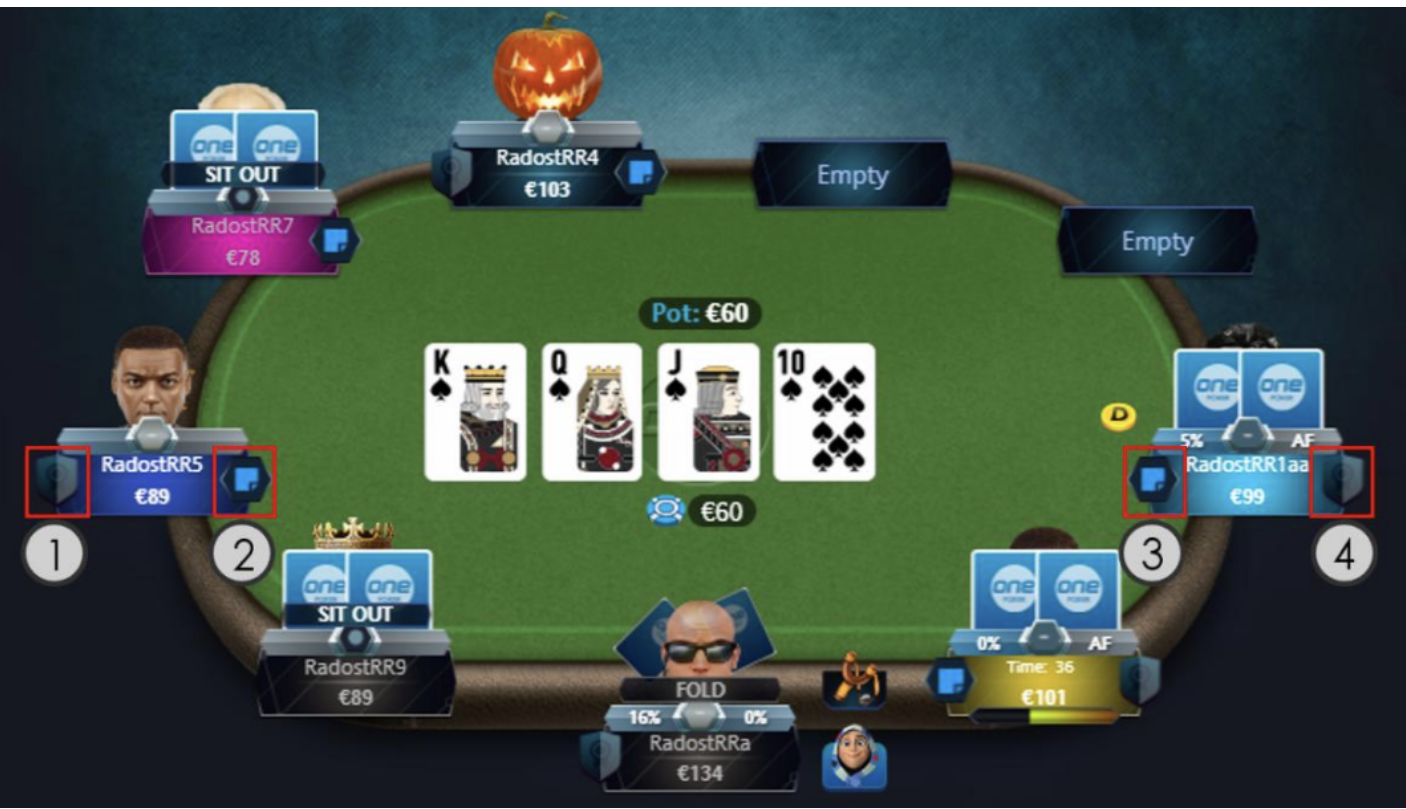 |
In addition to those changes, we also revamped your notes icon, as visible above.
OPTION TO EXPORT TRANSACTION HISTORY IN PDF FORMAT
In this release, we enhanced the ‘Poker Transaction History Export’ feature with the new PDF option. This means that from now on, you will also be able to export your transaction history in PDF format in addition to the other already supported formats. The change has been implemented for the Download Desktop and Web clients.
FOLD FUNCTION OF THE RMB
To improve gameplay and speed up play, release 26.1 adds the ability to discard cards using a right-click. Right-click behavior can be customized in the new "Right-Click Actions" drop-down menu located in the "Bet Buttons" section of the client settings.
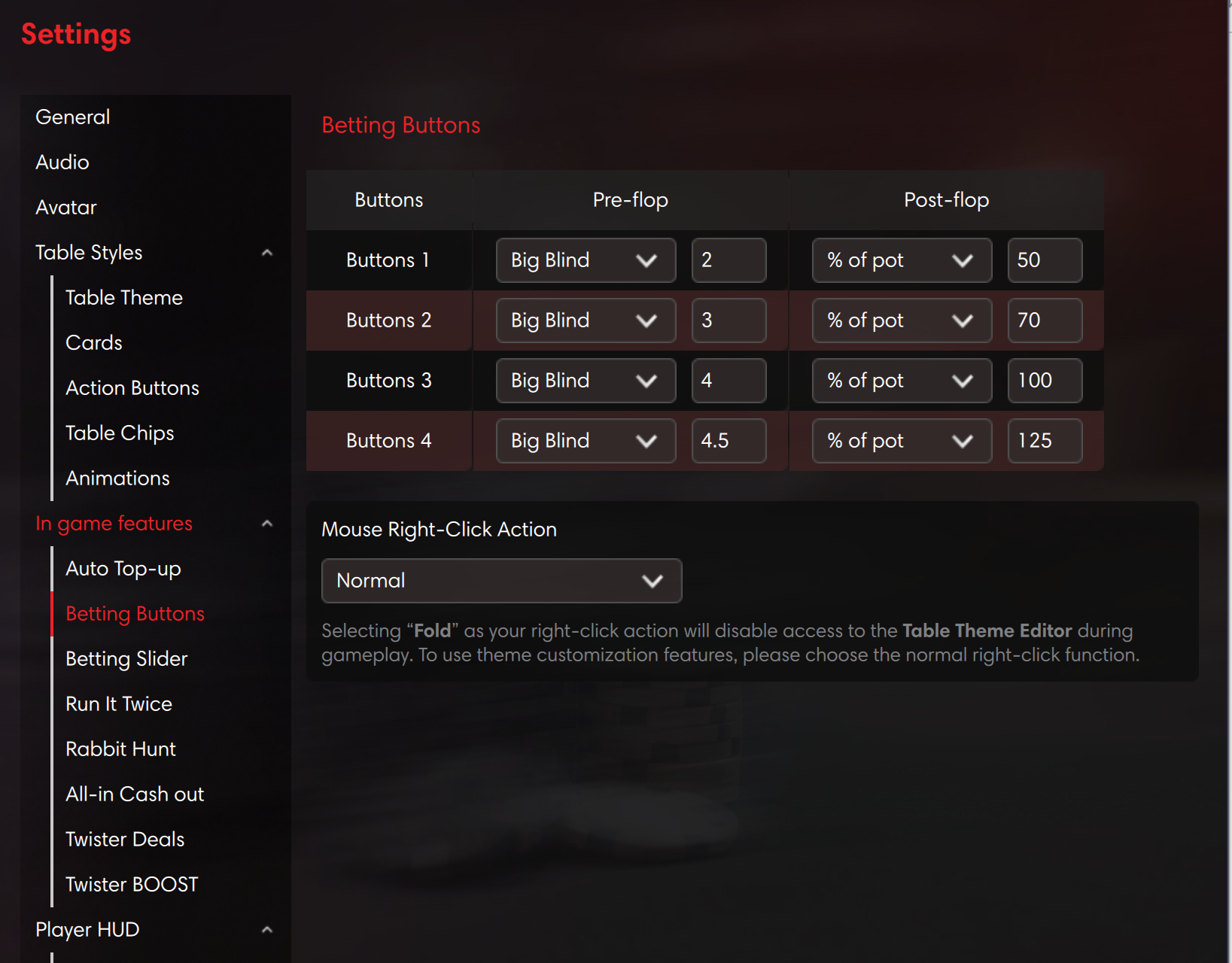 |
As seen above, you can choose one of two right-click options:
▪ Normal – right-clicking simply opens the table theme editor (as before).
▪ Fold – right-clicking anywhere on the table when it's a your's turn folds the current hand. This also applies to Speed Fold tables.
Note that clicking the table when it's not your's turn still opens the table theme editor.